Git Under the Hood: Exploring the .git Directory
Just a dev trying to write code that doesn’t crash (most of the time).
Git, the most popular distributed version control system, often seems like magic. Commands like git add, git commit, or git checkout usually work well, but few developers ask what really happens inside.
The truth is, Git isn’t mysterious or too complex. At its core, Git is a content-addressable file system that tracks changes in your code using cryptographic hashing. Instead of thinking about files and folders, Git thinks in terms of snapshots, objects, and references—all stored inside the .git directory.
In this article, we’ll look deeper into how Git works internally. You’ll learn what the .git folder contains, how Git stores data using blobs, trees, and commits, and what really happens when you run commands like git add and git commit.
Initializing a Git Repository
When we start a Git repository using:
git init
Git creates a hidden folder named .git inside the project directory. This folder is hidden by default, but you can see it by running:
ls -a
This command shows all files, including hidden ones, and you'll see the .git folder.
How Git Stores Data Internally
Git doesn't track files in the usual way we think about them. Instead, Git saves snapshots of content using objects. These objects are stored inside:
.git/objects
Git uses SHA-1 hashing to name these objects. A SHA-1 hash is a 40-character hexadecimal string.
The first 2 characters are used as the folder name
The remaining 38 characters are used as the file name
This makes storing objects efficient.
1. Blobs (File Content)
A blob represents the content of a file, not the file name.
If two files have the same content, Git stores only one blob. This optimization helps save space.
Git creates the blob by hashing the file’s content using SHA-1
Blobs do not store metadata like file name or folder location
So, blobs are simply raw snapshots of file data.
2. Trees (Directory Structure)
A tree represents a directory.
Trees store:
File names
Pointers to blobs (for files)
Pointers to other trees (for subdirectories)
Trees define how files and folders are organized
3. Commits (Snapshots of the Project)
A commit represents a complete snapshot of your project at a specific point in time.
A commit object contains:
A pointer to a root tree
The parent commit (or commits)
Author information
Timestamp
Commit message
When you run:
git commit
Git creates a new commit object that points to the current tree, which in turn points to blobs and subtrees.
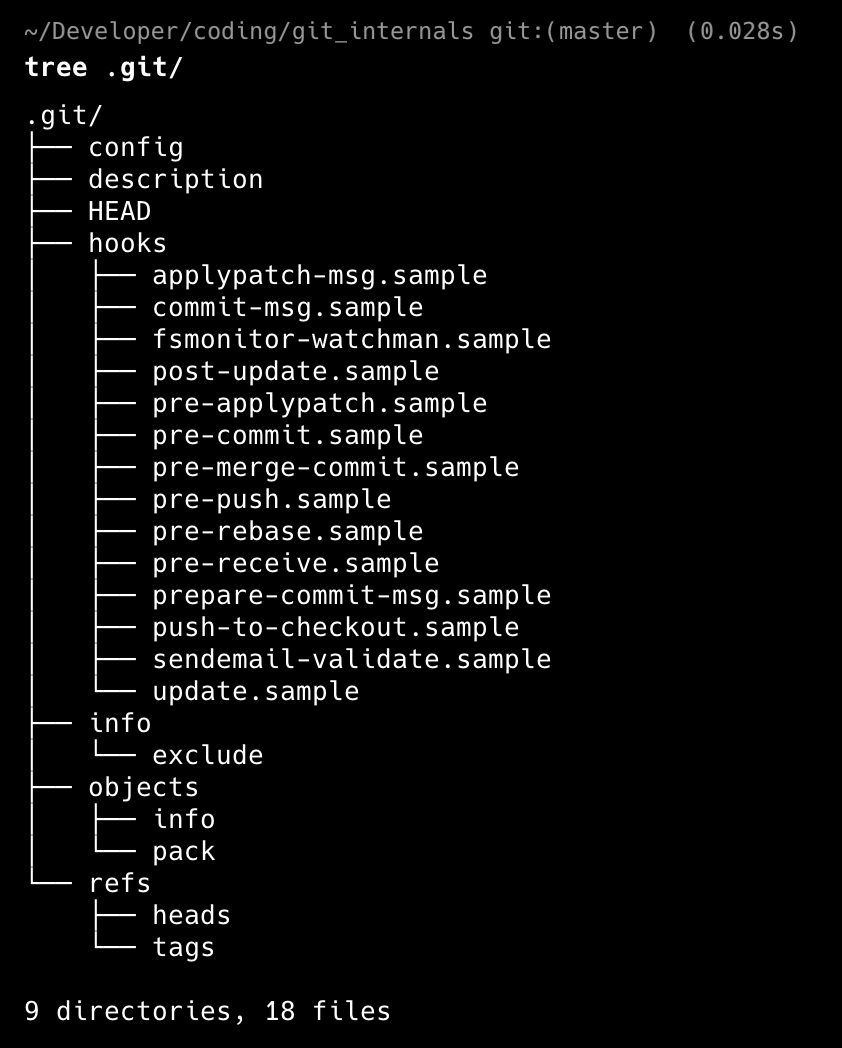
The .git directory :
Git Internals: Why It Is a DAG, Not Just a Tree
Git stores data using objects:
Blob → file content
Tree → directory structure
Commit → snapshot + history
Individually, tree objects look like trees, but the entire Git object graph is a Directed Acyclic Graph (DAG).
Example Project
project/
├── README.md
└── src/
    └── main.c
Step 1: git add README.md
When you run:
git add README.md
Git does only one thing internally:
Creates a blob object
Blob A (hash: a1b2)
Content: "Hello Git"
Important :
The blob stores only file content
No filename
No directory structure
No tree is created yet
Step 2 : git add src/main.c
git add src/main.c
Git again creates only a blob:
Blob B (hash: b2c3)
Content: "int main() {}"
Still:
No tree objects
No commit
Just blobs in
.git/objects
git addcreates blobs, NOT trees.
Tree objects are created only when a commit is made.
Step 3 : git commit -m "Initial commit"
This is the first time Git creates tree objects.
What happens internally
Git looks at the staging area (index)
It groups blobs into directories
It creates tree objects bottom-up
Created objects
Tree T1 (src/)
 └── main.c → Blob B

Tree T0 (root)
 ├── README.md → Blob A
 └── src → Tree T1
Then Git creates the commit:
Commit C1
 └── points to Tree T0
Commit points to the root tree, not directly to blobs.
At this stage, the structure looks like a tree.
Step 4 : Modify README.md and commit again
Change:
README.md → "Hello Git v2"
Run:
git add README.md
git commit -m "Update README"
What Git Does Internally (Second Commit)
New blob is created (content changed)
Blob C (new hash)
Content: "Hello Git v2"
Reuse unchanged objects
Blob B (main.c) ← reused
Tree T1 (src/) ← reused
New trees are created (only where needed)
Tree T2 (root)
 ├── README.md → Blob C
 └── src → Tree T1
New commit is created
Commit C2
 ├── points to Tree T2
 └── parent → Commit C1
Why This Becomes a DAG not a Tree
Now observe:
Tree T1is referenced by both commitsBlob Bis referenced by multiple trees
This means:
Nodes can have multiple parents
Objects are shared
No cycles exist
This structure is a Directed Acyclic Graph (DAG)
| Command | What is created |
git add | Blob objects only |
git commit | Tree objects + Commit object |
Where DAG Appears
Now look carefully:
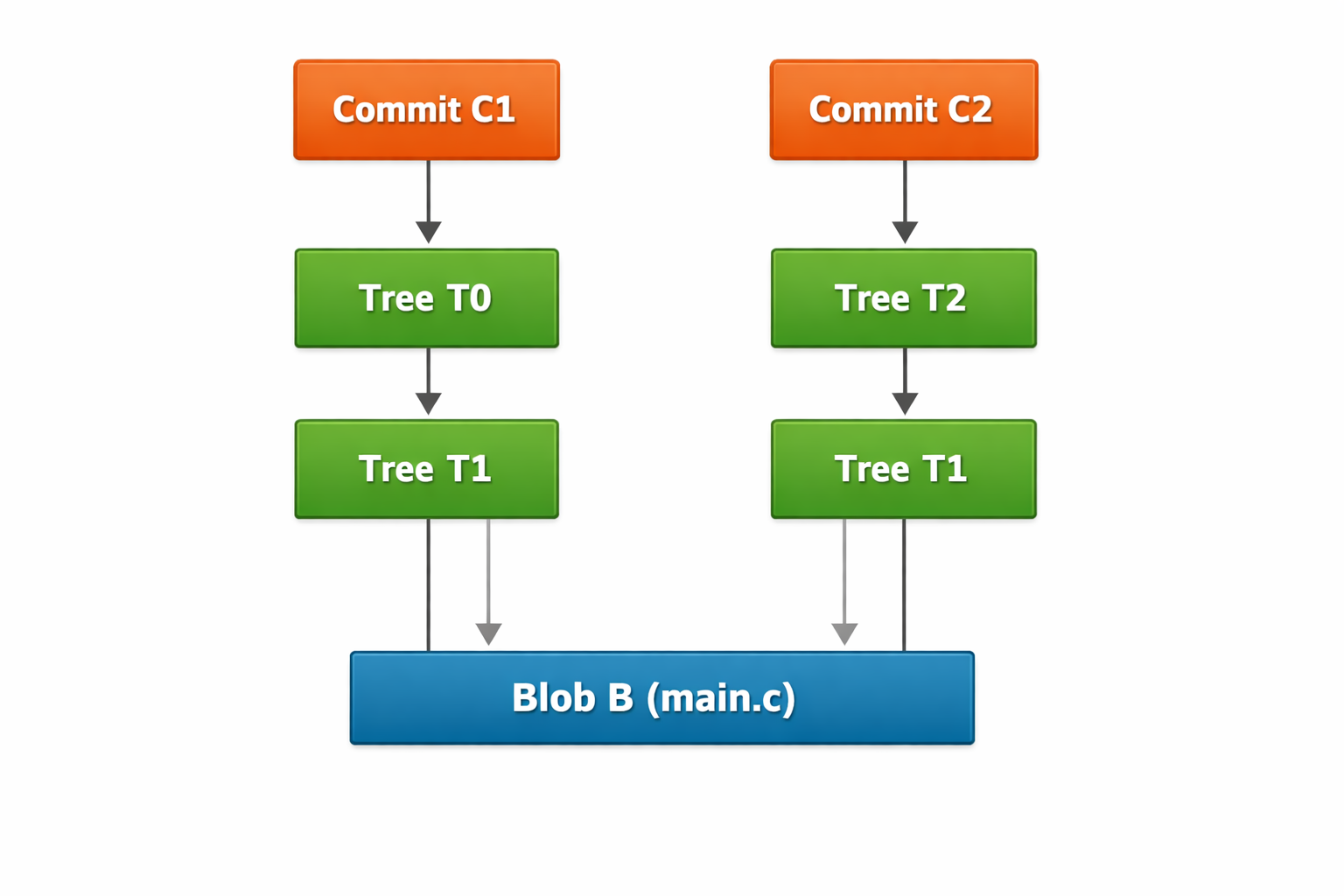
Same objects are shared by multiple parents
That cannot happen in a pure tree
This is a Directed Acyclic Graph (DAG):
Directed → pointers go one way (commit → parent)
Acyclic → no loops
Graph → nodes can have multiple parents
Final Thoughts
Understanding Git internals can really change how you think about version control. Once you see that Git doesn't track files or folders directly but instead stores unchangeable objects (like blobs, trees, and commits) connected through hashes, you'll have a much clearer picture of how Git works inside.
What looks like a simple directory tree is actually a Directed Acyclic Graph (DAG). By reusing objects, keeping them unchangeable, and linking them with hashes, Git becomes:
Fast (no unnecessary duplication)
Space-efficient (shared blobs and trees)
Reliable (history integrity is guaranteed)
This perspective helps explain many Git behaviors that often puzzle newcomers, like why commits are cheap, why branches are lightweight, and why merges are so powerful.